
Sales where no lead goes cold
Every inquiry has an owner and a next step. In the morning, the sales rep gets a list of who to call today, with no Excel filtering and nothing to remember.
- Leads from ads, forms and email in one place
- Owner and next step for every customer
- Reminders about quotes and follow-ups
- Sales funnel and a report for the boss
Take just this module and add more later.
What eats your time today
Inquiries live in an Excel sheet with filters. One filter left on is enough for a customer to disappear from view for a week.
Every inquiry passes through three pairs of hands before anyone calls the customer. On the way, the content, the deadline or the whole inquiry gets lost.
Follow-ups depend on the rep's memory. The call promised for Thursday slips, and meanwhile the customer buys elsewhere.
This works straight away, nothing to build
We build the module on Open Mercato, the open system we use for our rollouts. These features are ready in it, so the first weeks go into your process, not into tables and forms.
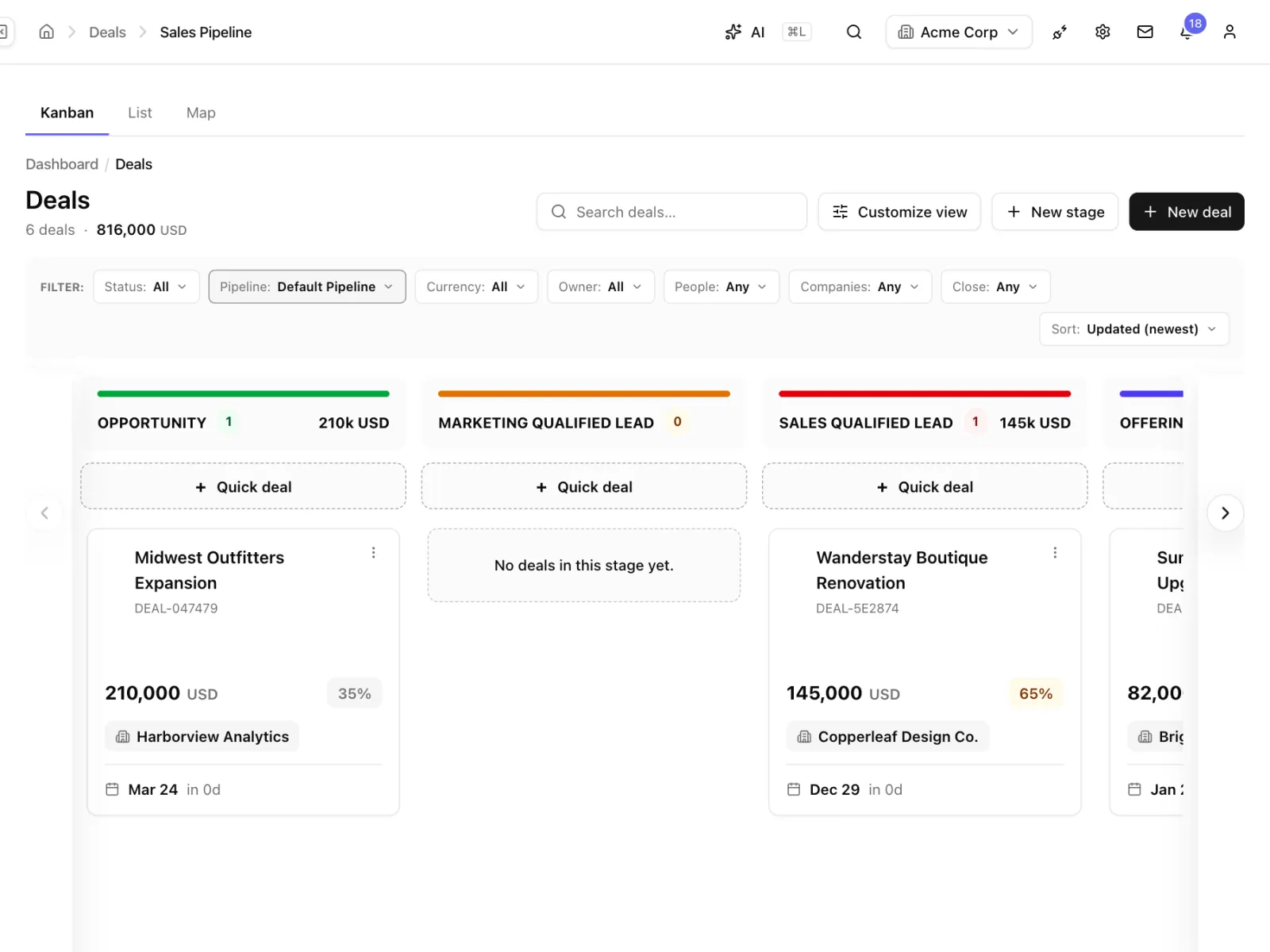
- Sales pipeline as a board, a list and a map
- Companies, people and the full contact history
- Tasks with a due date on every customer
- Meeting calendar
- Pipeline stages you set yourself
- Saved views for each sales rep, and export
On top of that we fit the rest: your names, steps and integrations.
The building blocks of your system
Each of these modules already runs in systems and mockups we built for manufacturing, trading and service companies. Pick a module and watch it work — then we will show it live on a free 30-minute consultation.
B2B customer portal. Customers check order status and download documents themselves. The office stops answering emails.
Service and tickets. Ticket, technician and appointment in one place. Customers see the status without calling.
Production planning. See what is on each workstation. Delays show up before the customer calls.
Timesheets and shop-floor time. Workers log time on a tablet on the shop floor. Each morning you see yesterday, and HR gets a ready file.
Quotes from inquiries. Drop in the customer's Excel and the system matches lines to stock. Quotes in minutes, not days.
Sales and CRM. Every inquiry has an owner and a next step. The system reminds you before the lead goes cold.
Warehouse and order fulfilment. Orders reserve stock, issuing takes it off. Stock matches the shelf.
Compliance documents. Declarations built from material and batch data. Suppliers fill in their own data.
Product catalogue. One product card for your shop, B2B and marketplaces. Change descriptions and photos in bulk.
Margin and purchase invoices. KSeF invoices come in by themselves, matched by EAN. You see real margin, not markup.
Simplified screens, made-up data — we show the real screens on the call.
How it works with the module
- 1Inquiries arrive in the system on their own
From ads, the website form or email. Each with an owner assigned straight away.
- 2In the morning: who to contact today
A call, a quote or a meeting, always with a date. The rep ticks off the contact, from the phone too, and sets the next step.
- 3Status follows from the work
Quote sent, customer replied, contract signed. Whatever follows from work already done, the system sets itself, so you see what's stuck without asking around.
- + Email and calendar inside the CRM
- + Phone system
- + AI assistant summarising calls
Questions about this module
We don't need a big CRM. Isn't this overkill?
That's what we usually hear: “a minimal tool with maximum effect.” So we don't start with a pipeline and reports, but with a daily contact list built on your spreadsheet and your stage names. The rest comes when you need it.
How is this different from an off-the-shelf CRM like Bitrix24 or Pipedrive?
An off-the-shelf CRM is cheaper to start, that's true. But it imposes its own process and needs a lot of clicking, so it often ends up as a chat tool or an abandoned account. We build this module around how you sell, and statuses follow from work already done. One forgotten follow-up on a large contract usually costs more than the subscription difference.
Will you move data from our current CRM or Excel?
Yes. Importing customers and contact history is part of the start, from a file or via API. During the transition both tools can run side by side, so you switch off the old one only once the new one works.
Do I pay per user?
When the system runs on your own server, the number of users is unlimited. Adding a sales rep or an assistant doesn't change the bill.
Can a sales rep use it from a phone?
Yes. Today's list, the customer card and the post-call note work on the phone in the browser. No more zooming into Excel with your fingers in the car.
Configure a system with this module
Three steps, about a minute. At the end you leave an email or phone number and the person who will configure it with you gets in touch.