
Service where no ticket gets lost
Ticket, technician and appointment in one place. Technicians have the job on their phone and take photos step by step, while the office and the customer see the status without calling them.
- Tickets from forms, email and phone in one queue
- Technician calendar and visit scheduling
- The visit on the phone: task list and step-by-step photos
- Equipment and ticket history
Take just this module and add more later.
What eats your time today
Tickets land in personal inboxes and phones. Nobody sees the whole queue, and customers ask for status from whoever happens to be on holiday.
Where technicians went and how long a trip took, the manager reconstructs from GPS and from time sheets handed in a month later.
Photos from a visit trickle in from several phones with no description. The office spends hours sorting them into a report for the customer.
This works straight away, nothing to build
We build the module on Open Mercato, the open system we use for our rollouts. These features are ready in it, so the first weeks go into your process, not into tables and forms.
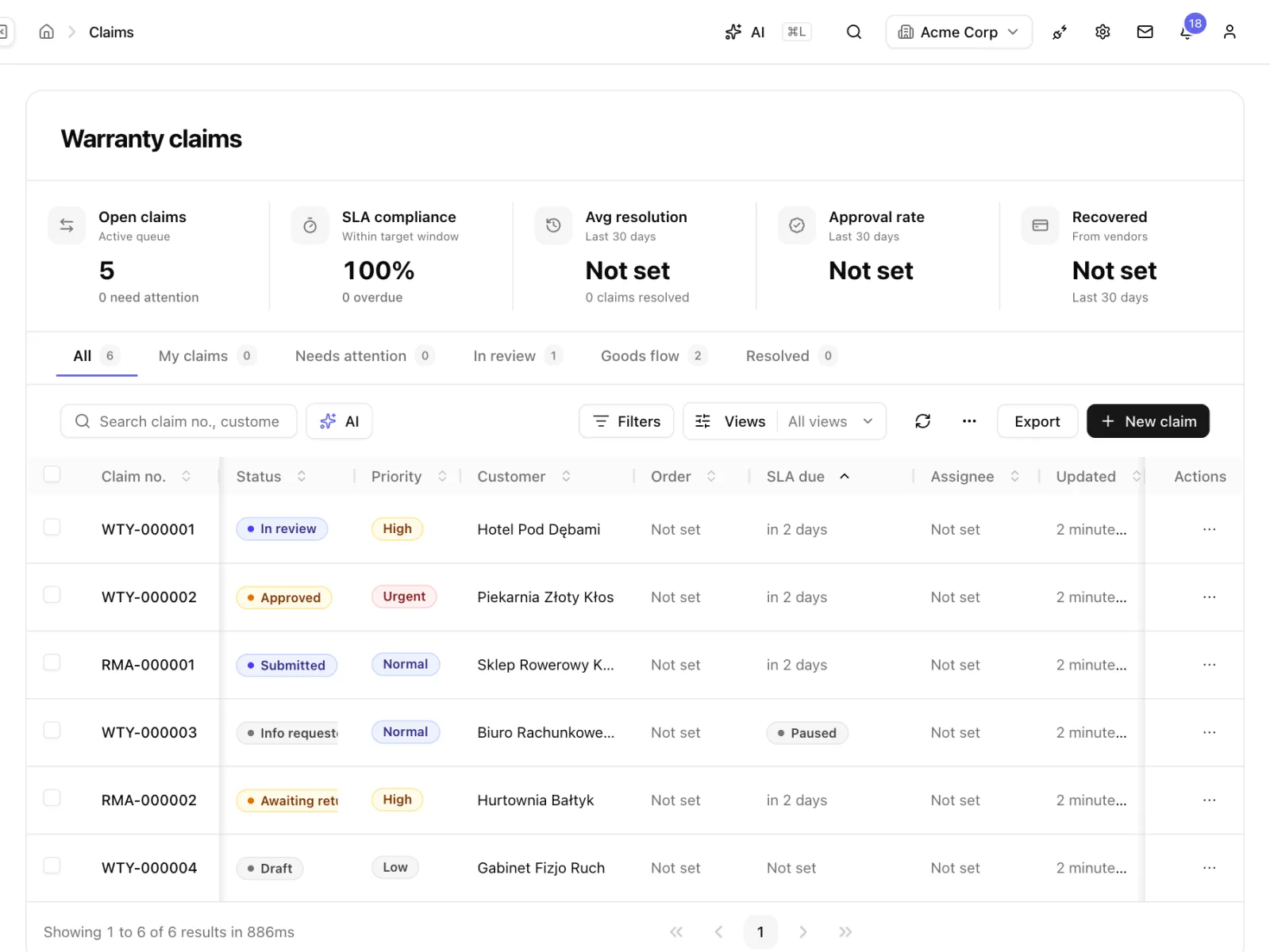
- Ticket queue with status and priority
- An SLA deadline on every ticket
- A portal where customers report issues and follow them
- Returns: label, receiving and condition check
- Replacement or credit note straight from the ticket
- Recovery from the supplier when the fault is theirs
- AI: ticket assessment and a draft reply to the customer
- Equipment registration and troubleshooting guides
On top of that we fit the rest: your names, steps and integrations.
The building blocks of your system
Each of these modules already runs in systems and mockups we built for manufacturing, trading and service companies. Pick a module and watch it work — then we will show it live on a free 30-minute consultation.
B2B customer portal. Customers check order status and download documents themselves. The office stops answering emails.
Service and tickets. Ticket, technician and appointment in one place. Customers see the status without calling.
Production planning. See what is on each workstation. Delays show up before the customer calls.
Timesheets and shop-floor time. Workers log time on a tablet on the shop floor. Each morning you see yesterday, and HR gets a ready file.
Quotes from inquiries. Drop in the customer's Excel and the system matches lines to stock. Quotes in minutes, not days.
Sales and CRM. Every inquiry has an owner and a next step. The system reminds you before the lead goes cold.
Warehouse and order fulfilment. Orders reserve stock, issuing takes it off. Stock matches the shelf.
Compliance documents. Declarations built from material and batch data. Suppliers fill in their own data.
Product catalogue. One product card for your shop, B2B and marketplaces. Change descriptions and photos in bulk.
Margin and purchase invoices. KSeF invoices come in by themselves, matched by EAN. You see real margin, not markup.
Simplified screens, made-up data — we show the real screens on the call.
How it works with the module
- 1The ticket joins one queue
From a form, email or phone, linked straight away to the customer and the equipment. Customers can also report an issue themselves in a simple portal and follow its status there.
- 2You assign a technician in the calendar
You see who's free. The technician gets the job on their phone, with the address and equipment history.
- 3The technician runs the visit on the phone
They tick off tasks from a list, take photos in the order the screen suggests and dictate notes. The office gets photos attached to each defect, ready for the report.
- + Partner portal for tickets
- + Spare parts and service stock
- + Invoice right after the visit
Questions about this module
Do technicians need a separate app?
Usually not: they handle jobs in the browser on their phone, with nothing to install. The exception is work where there's no signal. Then we build an app that stores everything on the phone and sends it once it's back online.
How do you fill it in wearing gloves or working at height?
Technicians don't fill in fields. They tick off completed tasks from a list, dictate notes and take photos step by step. The keyboard is the exception.
Can customers report issues themselves?
Yes. They get a simple portal: log in, describe the problem, attach a photo and follow the status. You get every ticket in one place instead of several inboxes.
What if someone deletes a photo by mistake?
Deleting needs confirmation, and every change is kept in the history: who, when and what. Visit photos are evidence for the customer, and we treat them that way.
How do I know people will actually use it?
“We'll build something again and it'll be abandoned again” is something we hear at almost every first meeting. So we start with one team, write the acceptance criterion before we begin, and run paper in parallel for the first two weeks. Paper goes only once the system beats it.
Configure a system with this module
Three steps, about a minute. At the end you leave an email or phone number and the person who will configure it with you gets in touch.