
A warehouse where you know what is where
Stock that matches the shelf. An order reserves the goods, issuing takes them off stock, and each item has one number no matter what the supplier calls it.
- Stock and locations, across several warehouses
- Stock reserved for orders
- Issuing from documents, no scanning every piece
- One item number for supplier and sales
Take just this module and add more later.
What eats your time today
Goods go into costs, not into the warehouse. Only whoever was last at the shelf knows how much there really is.
Stock in the shop or the offer drifts away from the shelf. It ends with a late shipment, an apologetic phone call and a bad review.
One big count a year shows the difference but not when or where it came from.
This works straight away, nothing to build
We build the module on Open Mercato, the open system we use for our rollouts. These features are ready in it, so the first weeks go into your process, not into tables and forms.
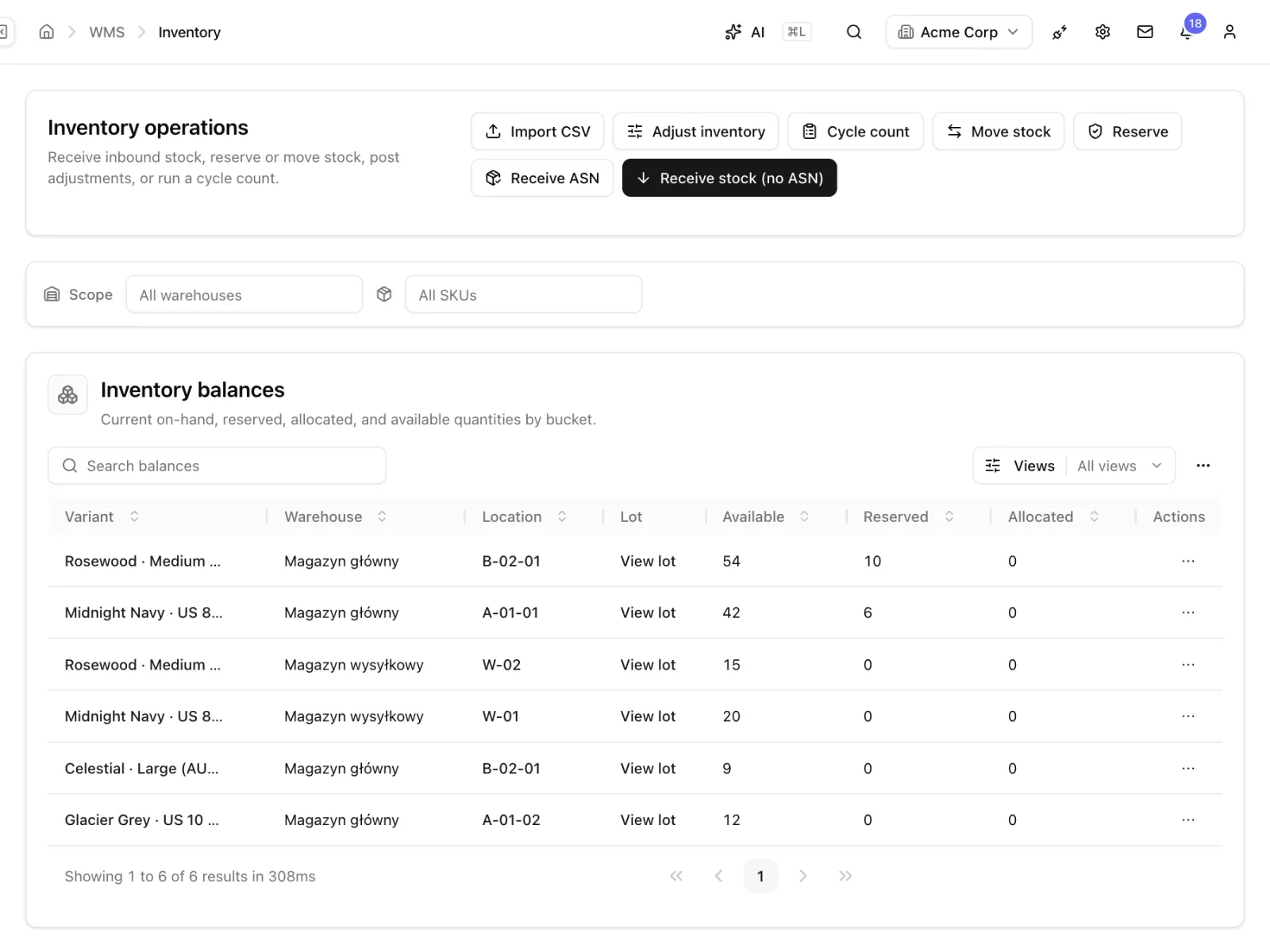
- Several warehouses, zones and locations down to the shelf
- Receiving with an advance shipping notice (ASN) or without
- Receiving and put-away with a scanner
- Stock reserved for sales orders
- Lots, serial numbers and expiry dates (FIFO, FEFO)
- Adjustments, transfers and cycle counts
- Dashboard: low stock, expiring lots, today's movements
- Stock import from a CSV file
On top of that we fit the rest: your names, steps and integrations.
The building blocks of your system
Each of these modules already runs in systems and mockups we built for manufacturing, trading and service companies. Pick a module and watch it work — then we will show it live on a free 30-minute consultation.
B2B customer portal. Customers check order status and download documents themselves. The office stops answering emails.
Service and tickets. Ticket, technician and appointment in one place. Customers see the status without calling.
Production planning. See what is on each workstation. Delays show up before the customer calls.
Timesheets and shop-floor time. Workers log time on a tablet on the shop floor. Each morning you see yesterday, and HR gets a ready file.
Quotes from inquiries. Drop in the customer's Excel and the system matches lines to stock. Quotes in minutes, not days.
Sales and CRM. Every inquiry has an owner and a next step. The system reminds you before the lead goes cold.
Warehouse and order fulfilment. Orders reserve stock, issuing takes it off. Stock matches the shelf.
Compliance documents. Declarations built from material and batch data. Suppliers fill in their own data.
Product catalogue. One product card for your shop, B2B and marketplaces. Change descriptions and photos in bulk.
Margin and purchase invoices. KSeF invoices come in by themselves, matched by EAN. You see real margin, not markup.
Simplified screens, made-up data — we show the real screens on the call.
How it works with the module
- 1An order reserves stock
When an order comes in, the goods are reserved straight away, so nobody sells them twice.
- 2Issuing takes stock off
The warehouse issues goods as it does today, and stock comes off from the signed issue document. Nobody has to scan every piece.
- 3Short counts instead of one big one
Every week you count one shelf or one group of goods with a phone. Differences show up straight away, on the specific item.
- + Stocktaking by phone
- + Couriers and BaseLinker
- + Labels and barcodes
Questions about this module
Do we have to scan every piece?
No. In most companies we talk to, that would eat more time than it saves. Stock comes off from the issue document. A phone camera or a scanner helps with receiving and counting, but isn't required.
What if stock doesn't match at the start?
It almost never does, and that's normal. For the first months we run short weekly counts, unconfirmed items start from zero, and stock converges on reality after a few cycles. It usually takes about three months.
The same item has several numbers here. What do we do about that?
That's one of the first things to sort out. The supplier's number, your internal number and the sales number are tied to one item, so the invoice, the issue document and the offer all mean the same thing.
Can it handle several warehouses?
Yes. Each warehouse, including a technician's or sales rep's van, has its own stock, and a transfer between them is one document. See them all together or each one separately.
Our previous big system never worked. Why would this one?
“I waited ten years for it to work” is a story we hear often. So we split the work into stages of two to three weeks, each with an acceptance criterion written before we start. The next stage begins only after the previous one is accepted on your data.
Configure a system with this module
Three steps, about a minute. At the end you leave an email or phone number and the person who will configure it with you gets in touch.