
Paperless timesheets. Know how many hours went into each job
Workers log time on a shop-floor tablet in seconds. The manager sees yesterday every morning, and HR gets a ready file instead of a pile of cards.
- Tablet terminal: key fob, job, operation, hours
- Morning huddle: missing entries, cleaning, over standard
- Hours per job against the standard
- Week closed straight into your payroll software
Take just this module and add more later.
What eats your time today
Hours arrive on paper once a week or once a month. By the time someone retypes them, nothing can be fixed any more.
How many hours really went into one job is known only after adding up cards from several departments. In practice nobody does it.
A question about one job from last month means pulling out a binder and leafing through weekly cards name by name.
Click through it yourself, the way it works on the shop floor
This is a clickable prototype we built for a manufacturing plant, with sample data (in Polish). You can switch roles: worker on the tablet, manager, HR.
Sample data. Reloading the page restores the starting state.
This works straight away, nothing to build
We build the module on Open Mercato, the open system we use for our rollouts. These features are ready in it, so the first weeks go into your process, not into tables and forms.
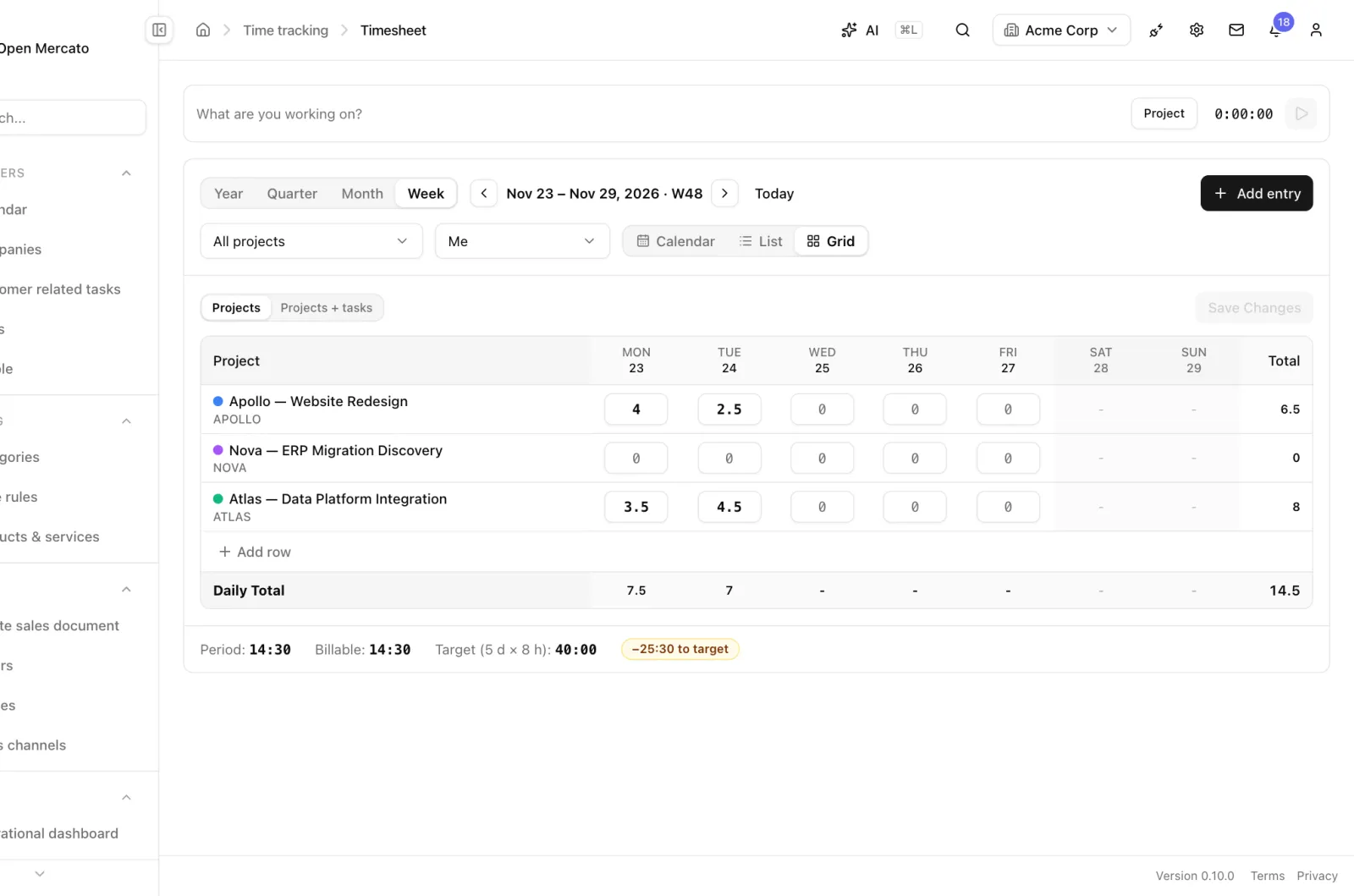
- Hours grid by week and month, with a daily target
- Timer: start and stop on a task
- Projects and tasks to log hours against
- Leave requests and absences
- Time reports
On top of that we fit the rest: your names, steps and integrations.
The building blocks of your system
Each of these modules already runs in systems and mockups we built for manufacturing, trading and service companies. Pick a module and watch it work — then we will show it live on a free 30-minute consultation.
B2B customer portal. Customers check order status and download documents themselves. The office stops answering emails.
Service and tickets. Ticket, technician and appointment in one place. Customers see the status without calling.
Production planning. See what is on each workstation. Delays show up before the customer calls.
Timesheets and shop-floor time. Workers log time on a tablet on the shop floor. Each morning you see yesterday, and HR gets a ready file.
Quotes from inquiries. Drop in the customer's Excel and the system matches lines to stock. Quotes in minutes, not days.
Sales and CRM. Every inquiry has an owner and a next step. The system reminds you before the lead goes cold.
Warehouse and order fulfilment. Orders reserve stock, issuing takes it off. Stock matches the shelf.
Compliance documents. Declarations built from material and batch data. Suppliers fill in their own data.
Product catalogue. One product card for your shop, B2B and marketplaces. Change descriptions and photos in bulk.
Margin and purchase invoices. KSeF invoices come in by themselves, matched by EAN. You see real margin, not markup.
Simplified screens, made-up data — we show the real screens on the call.
How it works with the module
- 1Entry on the shop-floor terminal
Key fob, job, operation code, hours in 15-minute steps. “Same as last time” cuts an entry to two taps, so there is no queue at the terminal.
- 2Morning huddle with yesterday
The manager sees who didn’t log time, who padded the day with cleaning and which operation ran over the standard. It gets discussed right away, not a month later.
- 3Jobs and HR without retyping
Hours add up on the job and department automatically, next to the standard. A closed week goes to HR as a file for your payroll software.
- + Overtime with manager approval
- + Field technicians logging trips by phone
- + Vehicle book and department sign-offs
Questions about this module
Won’t there be a queue at the terminal at the end of the shift?
It’s the first worry on every shop floor. An entry is a key fob and a few taps; repeating yesterday’s job is two. We size the terminals to the headcount: with sixteen people and two tablets the queue is about six minutes. Hours can also be logged during the day, not only at the end.
What if someone logs more hours than they worked?
The system knows the standard per operation and the working day. An entry over eight hours asks for an overtime reason, and padding the day with cleaning or an operation over the standard shows up at the morning huddle. No digging through cards.
What about people working away from the shop floor?
Field technicians and people on business trips log the day by phone: job, work, travel and overnight stay. The manager sees these entries live, together with shop-floor hours.
Does it work with our payroll software?
Yes. Closing the week creates a file in the format your payroll software accepts: regular hours, approved overtime and absences. Subcontractors are counted separately because they don’t go to payroll.
Can I start with one department?
Yes, that’s how we usually start. One tablet in one department, operation codes from your sheet, two weeks on real jobs. Then more departments, overtime and a production plan calculated from those hours.
Configure a system with this module
Three steps, about a minute. At the end you leave an email or phone number and the person who will configure it with you gets in touch.