
Production you can see on one screen
Orders across departments and workstations, with capacity counted in hours. When materials don't arrive or a rush order comes in, you move it and see straight away what shifts as a result, instead of three hours in Excel.
- Order timeline by department
- Workstation load week by week
- Customer deadline and delay warning
- Daily plan for foremen on a tablet
Take just this module and add more later.
What eats your time today
One rush order reshuffles the plan weeks ahead. Excel doesn't know what depends on what, so it gets rearranged by hand.
Missing material, sick leave, a breakdown: every change means hours of moving cells. And mistakes surface weeks later: “it turns out it's not July, it's August.”
One person knows the plan. When they're away, nobody knows what to schedule, and a newcomer has no chance of learning it.
This is how it looks on a real process
This screen comes from a clickable prototype we built for a manufacturing plant. Names, customers and standards are replaced with sample ones. The prototype is in Polish.
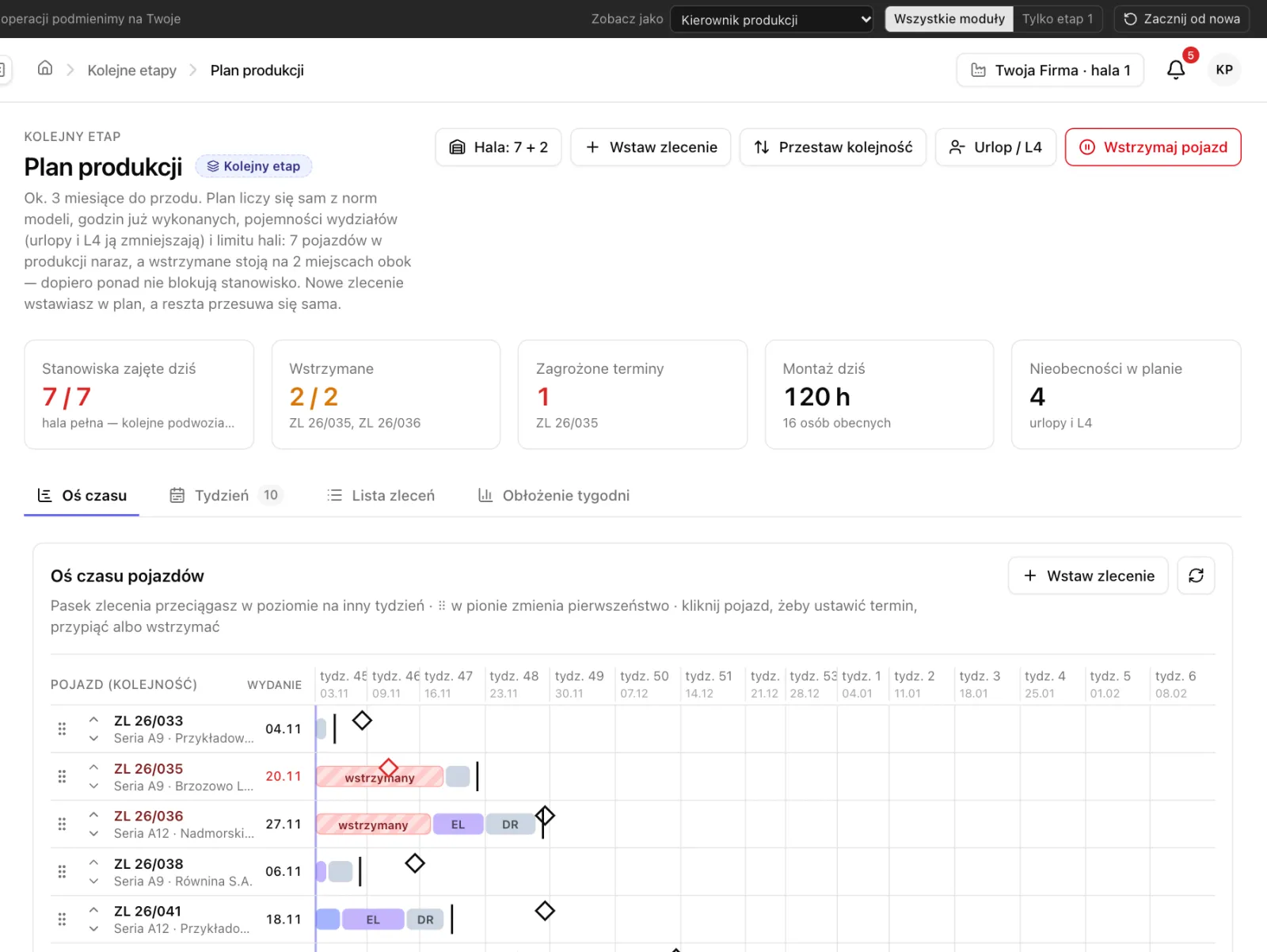
- A plan about three months ahead, calculated from standard times and hours already worked
- Department capacity reduced by holidays and sick leave
- A limit of workstations on the floor, plus space for orders on hold
- Insert a new order and the rest moves on its own
- Deadlines at risk are visible straight away
- Hours from timesheets feed the plan
We show a prototype like this on your process before you decide on a rollout.
The building blocks of your system
Each of these modules already runs in systems and mockups we built for manufacturing, trading and service companies. Pick a module and watch it work — then we will show it live on a free 30-minute consultation.
B2B customer portal. Customers check order status and download documents themselves. The office stops answering emails.
Service and tickets. Ticket, technician and appointment in one place. Customers see the status without calling.
Production planning. See what is on each workstation. Delays show up before the customer calls.
Timesheets and shop-floor time. Workers log time on a tablet on the shop floor. Each morning you see yesterday, and HR gets a ready file.
Quotes from inquiries. Drop in the customer's Excel and the system matches lines to stock. Quotes in minutes, not days.
Sales and CRM. Every inquiry has an owner and a next step. The system reminds you before the lead goes cold.
Warehouse and order fulfilment. Orders reserve stock, issuing takes it off. Stock matches the shelf.
Compliance documents. Declarations built from material and batch data. Suppliers fill in their own data.
Product catalogue. One product card for your shop, B2B and marketplaces. Change descriptions and photos in bulk.
Margin and purchase invoices. KSeF invoices come in by themselves, matched by EAN. You see real margin, not markup.
Simplified screens, made-up data — we show the real screens on the call.
How it works with the module
- 1The order goes onto the plan
From a sales order or from your ERP. It splits into stages and departments, each with its hours.
- 2Capacity comes from people
A department has as many hours as there are people at work today. Two people on holiday means fewer hours on the plan straight away, not a surprise on Friday.
- 3Move it and see the effect
You move a rush order earlier, and the plan shows which orders shift as a result and whether any will miss its deadline. Every move is logged with a reason.
- + Time tracking at the workstation
- + Material requirements
- + Quality control
Questions about this module
Does this replace my ERP?
It doesn't have to. “We want a production system” often means five different things: an order register, MRP, scheduling, shop-floor time tracking and costing. The module pulls orders from the ERP you already use, and in the consultation we agree what your ERP is missing and start there.
Who's going to fill it in?
That's the most important question, because a plan without shop-floor data won't work. So on the floor it's one tap on “done”, and everyone sees only their own queue. We measure success by the share of orders logged the same day, not by the go-live date.
People on the floor are afraid of breaking something. What then?
“Everyone's afraid to click” is something we hear on shop floors a lot. Every action can be undone, and the screen has a few large buttons that work by touch, even with dirty hands. We still do a short training at the workstation.
We have several programs and Excel files. What happens to them?
We don't migrate history from every program. To start, the structure from your Excel files is enough: departments, operations and standard times. Data that goes further, such as hours for payroll, the system exports as a file instead of someone retyping it.
Can I start with one line or one hall?
Yes, that's how we start. We launch the module in one department, test it on real orders and only then expand. A good first step is timesheets, because the plan is later calculated from those hours.
Configure a system with this module
Three steps, about a minute. At the end you leave an email or phone number and the person who will configure it with you gets in touch.